Feature story
The Ultimate Guide to Smart Speakers
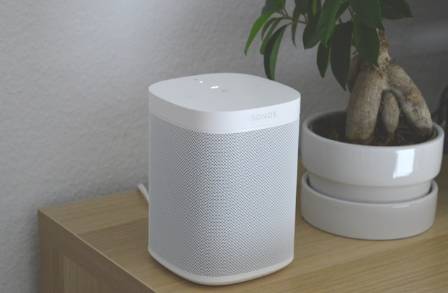
A smart speaker is essentially inactive until it is connected to a wireless network and paired with a smartphone or tablet application for configuration.
Owen Carter
Writer
Lounge note
Settle in — the full story and key updates are below.
Desk
Entertainment
A smart speaker is essentially inactive until it is connected to a wireless network and paired with a smartphone or tablet application for configuration.
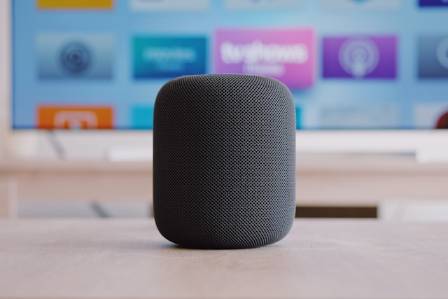
For instance, the Alexa app works as a companion tool for Amazon Echo, Echo Dot, Echo Show, and other Alexa-supported speakers. It allows users to complete the initial setup, manage settings remotely, and access additional functions. Likewise, the Google Home app is used to configure and control Google Assistant-enabled speakers. Depending on whether the setup device is an iPhone, iPad, Android phone, or tablet, users can download the required free application from the Apple App Store or Google Play Store. Setting up Apple’s HomePod is handled through the Apple Home app, which is typically already installed on iPhones.
Through these applications, users can assign names to their speakers, choose default preferences such as location and preferred music services, and connect compatible smart devices including smart lights, thermostats, and other home automation products. Apple’s HomePod is an exception because voice-controlled music features are limited to Apple’s own Apple Music service.
Expanding Smart Speaker Functions Through Connected Devices
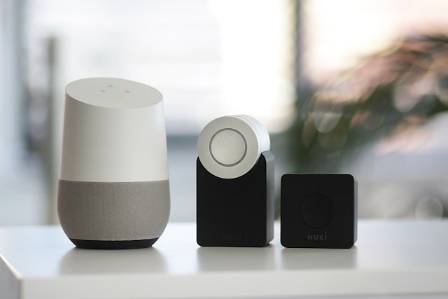
Beyond basic tasks like checking the weather forecast or listening to NPR, smart speakers can now operate thousands of connected home devices. However, to allow voice commands to interact with devices such as smart locks, users need to enable additional features. Amazon Alexa refers to these extensions as “skills,” while Google Assistant uses the term “actions.”
Skills and actions expand the abilities of smart speakers by adding services and controls. They can allow users to order food from services such as Domino’s, request transportation through Lyft, monitor fitness information with Fitbit, manage DVR systems like Dish or TiVo, adjust ceiling fans, or control household lighting.
Connecting Smart and Traditional Home Devices
When a device already includes smart technology, such as a built-in Wi-Fi connection, additional equipment may not be necessary. For example, after activating a speaker with its wake word, users can simply say a command like “TiVo skip” to bypass commercials without touching the remote control.
However, devices that are not originally designed for smart control may require extra hardware. A traditional remote-controlled fan, for example, cannot connect directly to Wi-Fi and may need a compatible hub such as Bond to transmit the required infrared or radio frequency signals.
Some smart home products rely on wireless standards other than Wi-Fi, including Zigbee and Z-Wave. In these situations, third-party hubs can serve as a connection point between devices and smart speakers like Amazon Echo Dot or Google Home Mini. The Samsung SmartThings Hub, which supports Alexa, allows users to control SmartThings-compatible products through voice commands.
Advantages of Voice-Controlled Smart Homes
One major advantage of operating smart home equipment through voice commands is reducing the number of physical controllers and apps needed. After adding the necessary skills or actions, users can control devices such as ceiling fans without searching for battery-powered remotes or opening separate smartphone applications.
Television remotes may also become less necessary. Several Logitech Harmony universal remotes support Alexa integration, allowing users to control parts of their home entertainment systems through voice commands. In addition, audio and video equipment manufacturers such as Yamaha and Denon provide limited Alexa compatibility when connected to a smart speaker on the same network.
Creating Smart Speaker Routines for Multiple Actions
Beyond individual skills and actions, both Alexa and Google Assistant provide a feature known as routines. A routine works like a customized command that combines multiple actions into a single instruction.
For example, a “movie night” routine could automatically turn on a Blu-ray player, switch the television to Netflix, activate an external sound system, close motorized curtains, start a connected coffee maker, adjust the air conditioner to a quieter setting, turn on a ceiling fan, lower main lights, and activate small pathway lights near the kitchen and bathroom.
Instead of completing each task separately, users can simply tell their smart speaker that it is movie night, and the connected devices will carry out the programmed sequence automatically.
Learning and Improving Smart Speaker Performance
Users are not the only ones helping smart speakers become more capable. Online communities, manufacturer support pages, and user forums continue to grow as people share experiences about voice assistants, setup processes, and newly available features.
Before adding new skills, actions, or routines, checking online guides and community discussions can help users understand the process better and avoid unnecessary setup problems. With continued learning and customization, smart speakers can become increasingly powerful tools for managing modern connected homes.
More to explore

· en
Chocolate Boba Milk Tea (Bubble Tea): Creamy, Decadent & Ready in 10 Minutes
Benjamin Walker

· en
Everything You Need to Know About Guinea Pigs
Declan Frost

· en
The Great Blue Hole in Belize: A Natural Wonder
Willa Grant

· en
Six Influence of Flowers on Mental Well-being
Elijah

· en
Things we love about lemurs!
Freya Lennox

· en
Most Comfortable Outdoor Chairs to Unwind at Home
Devon Pierce